
Tech Explorers: Game Development


Tech Explorers: Game Development—Game On! Code, Create, and Play
⚠️ Clearance Item - Final Sale
All clearance sales are final. No returns, refunds, or exchanges.
SKU: SKU:93937
Ships in approximately 3–4 weeks.
Couldn't load pickup availability


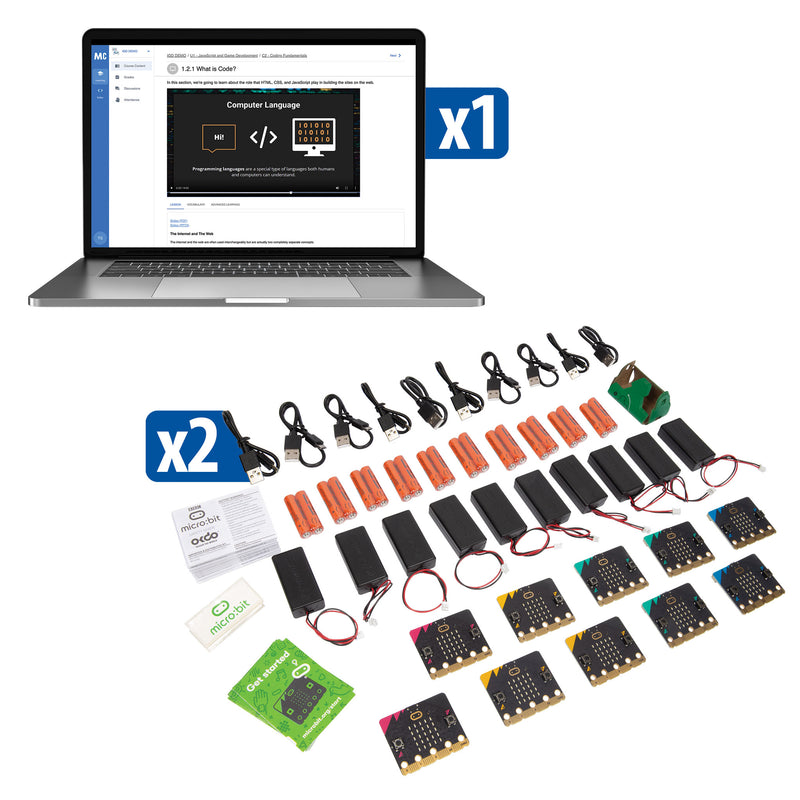
WHAT'S INCLUDED
- 30 student seats that are good for one year, beginning from the initial activation date
SPECIFICATIONS & SAFETY
- Curriculum Hours: 44
- Device Compatibility: 64-bit Windows 10 or later and macOS 11 or later
- Browser Compatibility: Google Chrome
- Required software: Unity Hub + Unity 2021 LTS, Blender 3.1 or later, and Microsoft Visual Studio Code
- Hardware Requirements: RAM: 8GB or more; CPU: 64-bit quad-core AMD GCN1/Intel Haswell or newer; GPU: DX10 Support, 4GB VRAM, Geforce 400 or newer; Full HD (1920x1080p) display; full keyboard; three-button mouse with scroll wheel; headphone jack; and headphones
- Recommended Hardware: RAM: 16GB or more; CPU: 64-bit eight-core AMD GCN1/Intel Haswell or newer; and GPU: DX10 Support, 16GB VRAM Geforce 700 or newer


Frequently Bought Together

Design. Code. Play. Debug.
JavaScript Fundamentals
Students learn variables, functions, conditional statements, and object-oriented programming through interactive game projects—building real coding skills with industry-standard language.

Game Mechanics and Design
Teams explore game mechanics, randomness, arrays, and control structures while designing board games, text adventures, and word-guessing challenges.

Physical Game Controllers
micro:bit V2 boards with CodeCTRL controllers let students design physical arcade interfaces for their digital games—bridging software and hardware.

MakeCode Arcade
Students design, animate, and play their own 2-D games using the MakeCode Arcade platform, connecting block-based and text-based programming concepts.
What Students Will Do
- Create digital game art and design visual themes
- Write JavaScript code with variables, functions, and conditionals
- Build text adventure and word guessing games from scratch
- Design game mechanics with randomness, arrays, and feedback loops
- Program physical arcade controllers using micro:bit and CodeCTRL
- Design and animate a 2-D game in MakeCode Arcade
Compare Similar Products
| Feature |
Current Product
Tech Explorers: Game Development
| Tech Explorers: Web Development | Tech Explorers: Physical Computing |
|---|---|---|---|
| Price | $3,543.00 | $2,199.00 | $5,511.00 |
| Primary Focus | Game Development and Coding | Web Design and Development | Robotics and Physical Computing |
| Grade Level | Grades 6–8 | Grades 6–8 | Grades 6–8 |
| Curriculum Length | 44 class periods | 45 class periods | 43 class periods |
| Key Platform | Mastery Coding + micro:bit + MakeCode Arcade | Mastery Coding + micro:bit | Seeker Robot |
| Coding Language | JavaScript + MakeCode | HTML/CSS + MakeCode | Block-based (Seeker app) |
| Physical Hardware | |||
| Best For | Schools wanting a coding curriculum that blends game design, creative arts, and physical computing | Programs focused on web design fundamentals with UI/UX and front-end development | Schools wanting a comprehensive robotics program with mission-based challenges |
| View Details | View Details |
Why Teachers Love Tech Explorers®: Game Development

Forty-Four Class Periods
A full semester of game development curriculum from art and storytelling through JavaScript coding and physical arcade design.

Industry-Standard JavaScript
Students learn the same programming language used by professional web and game developers worldwide.

Physical and Digital
micro:bit controllers bridge the gap between screen-only coding and real-world physical computing.

Creative and Technical
Game design combines visual arts, narrative storytelling, and programming logic—engaging students who might not see themselves as coders.
250-Student License
Mastery Coding’s platform supports ten full sections of students with a single program purchase.

Pitsco Quality
Trusted by educators for over fifty years, Pitsco’s curriculum design ensures engaging, standards-aligned instruction.
"Your curriculum is deeper. You deliver 21st-century skills that truly teach kids how to not just look at the content but also be able to communicate and work collaboratively. And there is no comparison to your customer service."